Once your account is created on 51 Club, logging in becomes the gateway to everything – your wallet, games, rewards, and withdrawals.

While the login process itself is simple, many users still run into small issues such as entering incorrect details, forgetting passwords, or not knowing where to log in, especially when switching between the website and the app.
51 Club, officially known as 51 Game, uses a mobile-based login system, which keeps things secure and straightforward. As long as your registration details are correct, accessing your account takes just a few seconds.
If you haven’t created an account yet, you should complete that first.
Now let’s go step by step.
51 Club Login Steps
Step 1: Open the app or visit the website, then click Register. Or click on the login button below for easy access.
Step 2: Enter your registered mobile number and password.
Step 3: Click on the Log In button and you’ll enter your dashboard.
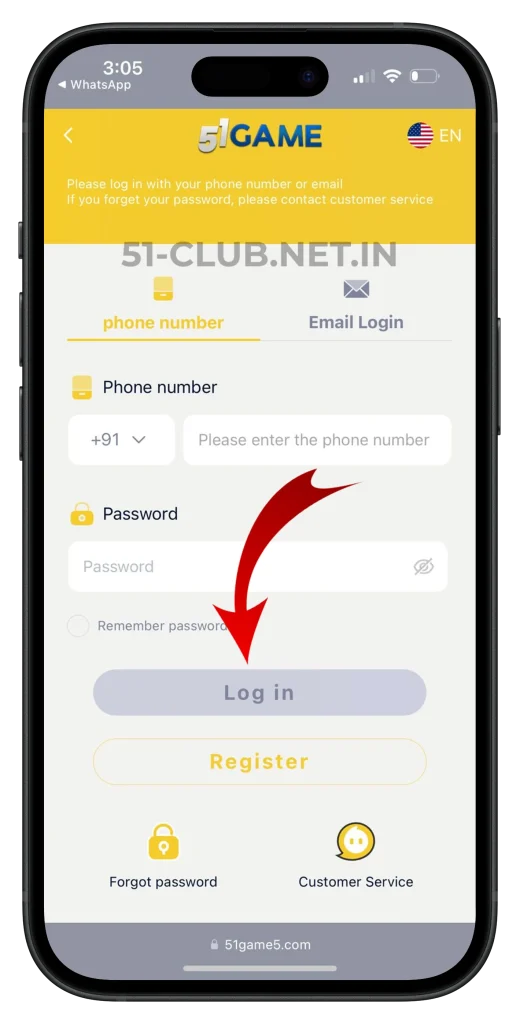
Once logged in, you’ll immediately land on your dashboard where you can access games, wallet, promotions, and all platform features.
Where Can You Log In From?
51 Club allows users to log in through both:
- The official website
- The Android app (APK version)
Most regular players prefer using the app because it offers faster access and smoother navigation. If you haven’t installed it yet, follow this guide.
Using the same login credentials, you can access your account from either platform without any difference.
What Happens After Login?
After logging in, your account dashboard becomes active.
From here, you can:
- Check your wallet balance
- Deposit money
- Withdraw winnings
- Explore different game categories
- Access referral and promotion features
If your goal is to start playing immediately, the next logical step is funding your account.
Or if you already have winnings, you can learn how to withdraw.
Forgot Password? Here’s What to Do
Forgetting your password is common, especially if you don’t log in daily. 51 Club provides a simple recovery option.
Just tap the “Forgot Password” option below the login button, then follow the prompts to reset it using your phone number.
Since your account is linked to your mobile number, password recovery remains quick and secure.
Common Login Issues and How to Fix Them
Even though the login system is simple, users sometimes face issues. Here are the most common ones.
Incorrect mobile number or password
This is the most frequent issue. Double-check your number and ensure there are no typing errors.
OTP or reset issues
If you’re resetting your password and not receiving OTP, check your network connection.
App-related problems
If the app isn’t opening or the login isn’t working properly, reinstalling the APK often fixes the issue. You can refer to.
Using multiple accounts
Avoid logging in with multiple accounts on the same device, as it may cause conflicts or access issues.
Tips for a Smooth Login Every Time
Always remember your registered mobile number and password.
Avoid saving your login details on shared devices.
If you play regularly, use the app instead of the browser for a smoother experience.
Log out after use if you’re using someone else’s phone.
Keep your app updated to avoid glitches or login errors.
Is 51 Club Login Secure?
The platform uses a mobile number and password combination, which ensures basic account protection.
Since password resets require access to your mobile number, it adds an extra layer of control.
However, your security also depends on your behavior. Never share your login credentials with anyone, even if they claim to be support staff.
For general best practices on account security, you can refer to.
When Should You Avoid Logging In?
Avoid logging into your account on public Wi-Fi networks or unknown devices.
These environments can expose your credentials and put your account at risk.
If you must log in on a different device, make sure to log out immediately after use.
Frequently Asked Questions
What do I need to log in to 51 Club?
You need your registered mobile number and password.
Can I log in without the app?
Yes, you can log in through the official website as well.
What should I do if I forget my password?
Use the “Forgot Password” option and reset it using your mobile number.
Why am I unable to log in even with correct details?
Check your internet connection, app version, or try logging in again after some time.
Is it safe to stay logged in on my device?
It is safe on your personal device, but avoid staying logged in on shared or public devices.
Conclusion
Logging into 51 Club is quick and easy, but doing it correctly ensures uninterrupted access to your account and funds.
Once you understand the process and avoid common mistakes, you won’t face any issues accessing your dashboard, games, or wallet.
If you’re just starting out, make sure your account is properly registered and your login details are saved securely.
From here, you can proceed to fund your account and explore the platform fully.