If you’re using 51 Club regularly, the wallet is the one feature you’ll interact with the most.
Every deposit you make, every game you play, and every withdrawal you request is handled through the wallet. Understanding how it works is essential for a smooth experience on the platform.

51 Club, officially known as 51 Game, keeps the wallet system simple and easy to navigate. But many users still overlook small details that can affect transactions or create confusion.
Once you understand how the wallet functions, managing your funds becomes much more controlled and predictable.
Before accessing the wallet, make sure you’re logged in.
Now let’s break it down.
What Is the 51 Club Wallet?
Contents
- 1 What Is the 51 Club Wallet?
- 2 How to Access the Wallet
- 3 How to Deposit Money Using Wallet
- 4 How to Withdraw Money Using Wallet
- 5 Understanding Your Wallet Balance
- 6 Minimum Limits You Should Know
- 7 Common Wallet Issues Users Face
- 8 Tips to Manage Your Wallet Safely
- 9 Why Wallet Understanding Matters
- 10 How Wallet Connects to Other Features
- 11 Frequently Asked Questions
- 12 Conclusion
The wallet at the 51 Club is where all your money-related activity happens.
It stores:
- Your deposited funds
- Your game winnings
- Your available balance for withdrawals
Think of it as your central control panel for managing money on the platform.
Every action, whether adding funds or withdrawing, starts from the wallet section.
How to Access the Wallet
Step 1: Open the app or website, then log in with your registered mobile number and password.
Step 2: Tap on the “Wallet” option in the bottom menu.
Once you’re inside, you’ll be able to see your balance and access deposit and withdrawal options.
How to Deposit Money Using Wallet
Step 1: Open the app or website and log in using your registered mobile number and password.
Step 2: Tap on the “Wallet” option in the bottom menu.
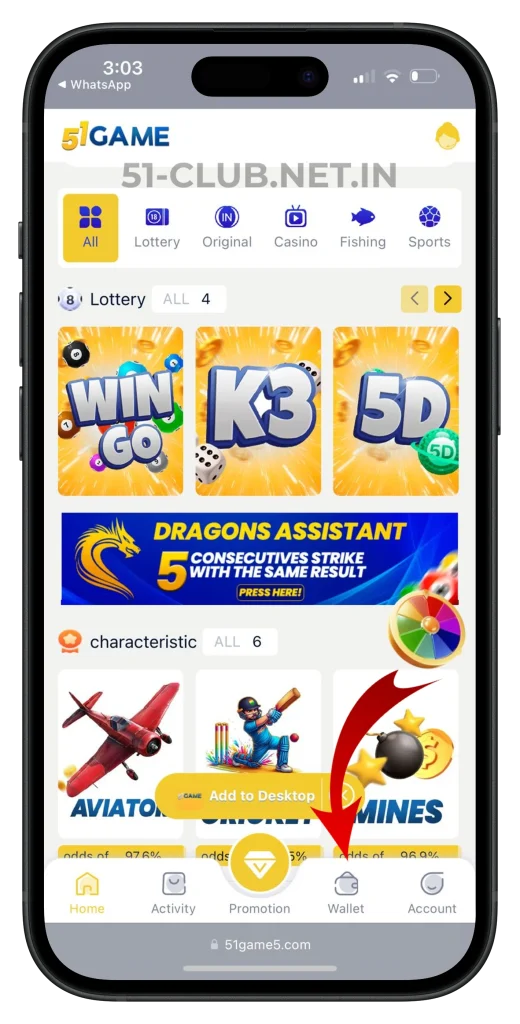
Step 3: On the wallet page, click on the “Deposit” Icon.
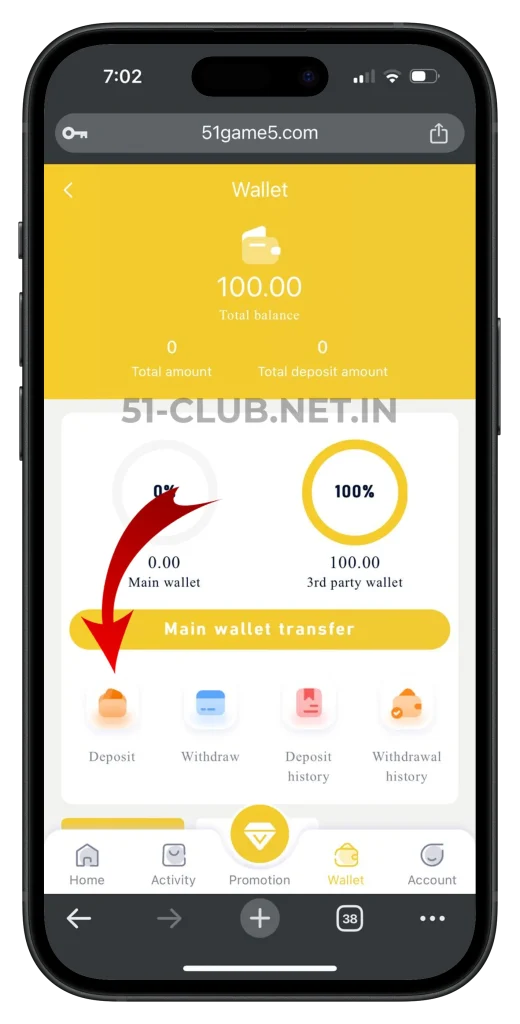
Step 4: Select the recharge amount from the available options (₹100, ₹200, ₹500, ₹1000).
Step 5: Select your preferred payment method and enter the details.
Step 6: Complete the Payment.
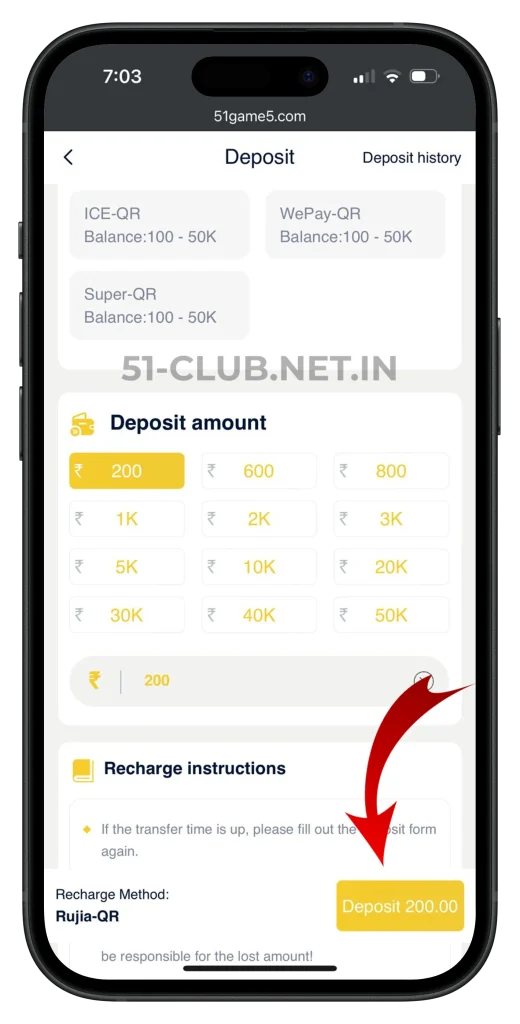
Step 7: Once the transaction is successful, the amount will instantly reflect in your 51 Club wallet.
If you want a detailed breakdown, refer to
How to Withdraw Money Using Wallet
Step 1: Open the 51Club app or website and log in to your account.
Step 2: Tap on the “Wallet” option in the bottom menu.
Step 3: In the wallet section, click on the “Withdraw” Icon.
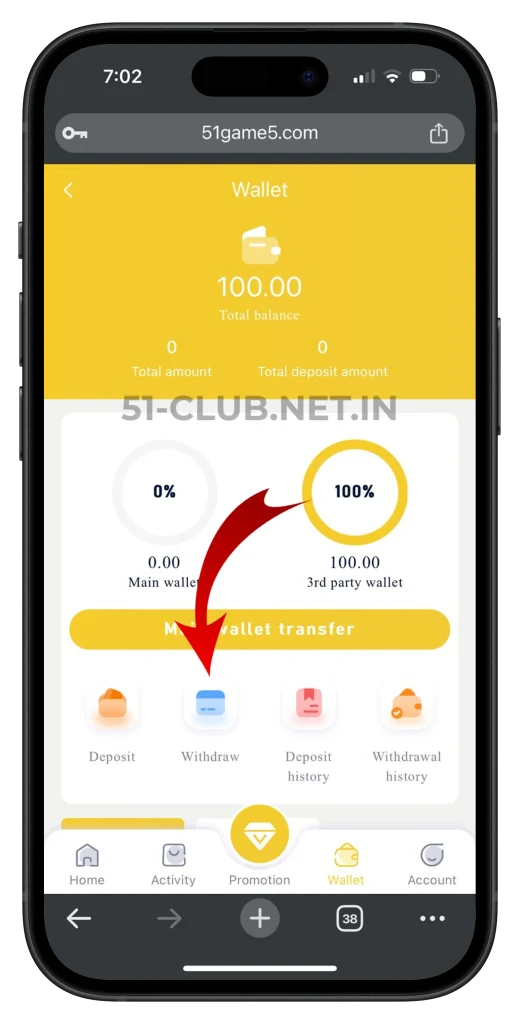
Step 4: Make sure you have at least the minimum withdrawal amount in your wallet.
Step 5: Enter withdrawal amount.
Step 6: Select the withdrawal method.
Step 7: Fill in your payment details.
Step 8: Confirm your details and proceed with the withdrawal request.
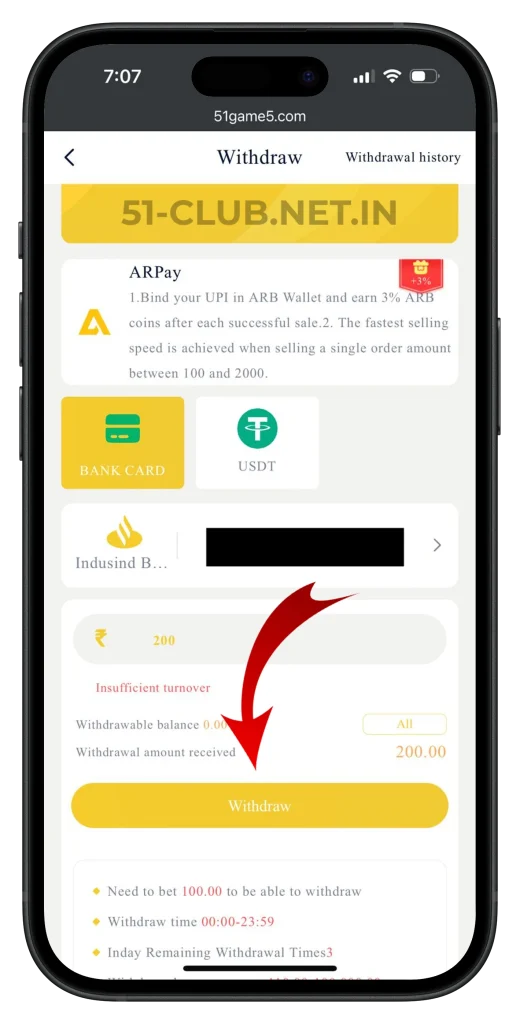
Step 9: Wait for confirmation. Your request will be processed, and money is typically credited within a few minutes to a few hours in your bank account.
For more details, you can check.
Understanding Your Wallet Balance
Your wallet balance is dynamic, meaning it changes based on your activity.
It increases when:
- You deposit money
- You win games
- You earn referral commissions
It decreases when:
- You play games
- You withdraw money
Keeping track of your balance helps you manage your gameplay better and avoid overspending.
Minimum Limits You Should Know
From the platform details:
- Minimum deposit starts from ₹100
- Minimum withdrawal requires at least ₹110 in your wallet
Understanding these limits helps you plan your transactions properly.
Common Wallet Issues Users Face
Balance is not updating immediately
Sometimes there may be slight delays after deposits. Wait a few minutes before taking action.
Withdrawal not processing
This can happen if your balance is below ₹110 or details are incorrect.
Confusion between available and usable balance
Always double-check your wallet before initiating transactions.
Tips to Manage Your Wallet Safely
Always double-check payment details before confirming transactions.
Avoid making multiple transactions at the same time.
Use a stable internet connection when accessing your wallet.
Keep your login credentials secure to protect your funds.
Why Wallet Understanding Matters
Many beginners focus only on playing games and ignore how the wallet works.
But experienced users know that proper wallet management helps in:
- Controlling spending
- Tracking winnings
- Avoiding transaction errors
It gives you better control over your entire experience on 51 Club.
How Wallet Connects to Other Features
The wallet is not a standalone feature.
It connects directly to:
- Deposit system
- Withdrawal system
- Referral earnings
- Gameplay balance
This is why understanding it helps you use the entire platform more effectively.
Frequently Asked Questions
Where can I find the wallet on 51 Club?
You can access it by tapping the “Wallet” option in the bottom menu after logging in.
What is the minimum deposit amount?
The minimum deposit starts from ₹100.
What is the minimum withdrawal requirement?
You need at least ₹110 in your wallet to withdraw.
How fast do wallet transactions happen?
Most deposits are instant, and withdrawals usually take a few minutes to a few hours.
Can I manage both deposits and withdrawals from the wallet?
Yes, both options are available inside the wallet section.
Conclusion
The 51 Club wallet is the core of your entire gaming and earning experience.
Once you understand how to use it properly, everything from deposits to withdrawals becomes simple and efficient.
Instead of treating it as just a balance section, use it as a tool to manage your funds smartly.
This approach not only improves your experience but also helps you avoid common mistakes that many beginners make.